How to Update or Remove Your Name from the Donor Registry
At Donate Life Kentucky Trust, we respect your decision about registering as a donor and want to help ensure your decision is updated.
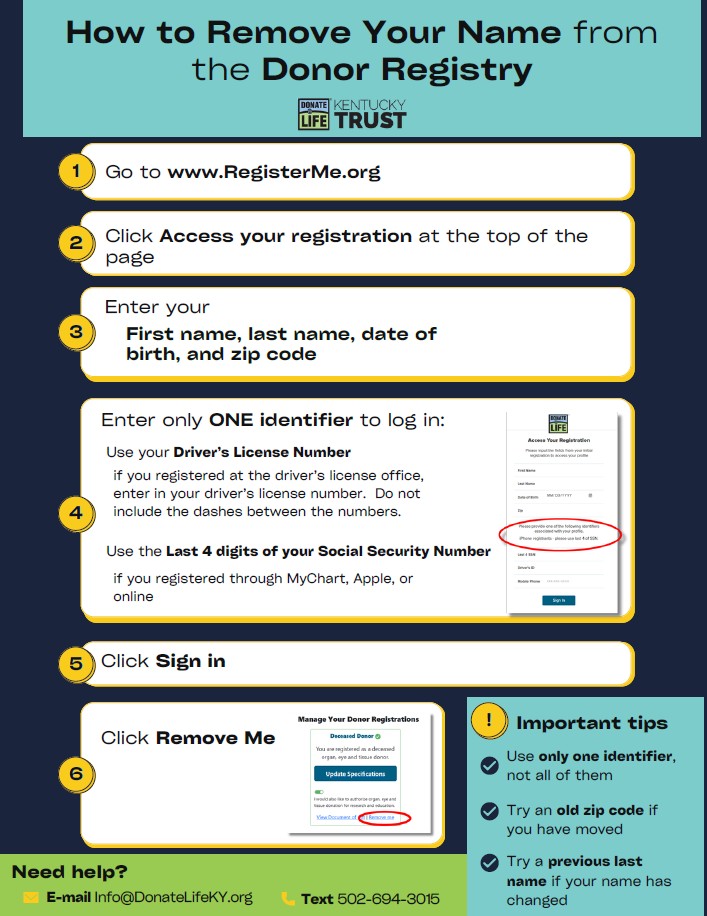
Fastest Way: Update or Remove Online
- First name
- Last name
- Date of birth
- ZIP code
- ONE identifier (Only enter 1 identifier – not all 3)
– If you registered at the driver’s license: Use your driver’s license number
– If you registered through MyChart, Apple, or online: Use the last 4 digits of your Social Security number
Try your current ZIP code. If that does not work, try a ZIP code from a place you lived before.
Try your maiden name.
Still stuck? We can help. Contact us!*
4. Once you are in, you can update your address, include specifications (of certain organs or tissues to be donated or not) or remove your name permanently.
To remove, go to “Manage Your Registrations”
Click “Remove me”
Important
If you remove your name online, you are no longer registered instantly. The registry is the legal record, not the heart on your driver’s license. Simply ask the driver’s license clerk to remove the heart next time you renew.
Need Support?
*Email: info@donatelifeky.org
Call or text: 502-694-3015
Send:
- Full name
- Date of birth
- Driver’s license number
We will get back to you during normal business hours. With your permission, we will remove your name for you or give you the information so you can remove yourself.
Key Takeaways
You can always remove your name from the Registry.
Only you can make this decision.
The Registry is what counts legally.
We apologize for any inconvenience due to the software systems, and we are here to help.
Related posts:
Driver’s License & Registry Modernization: What Need to Know – Donate Life KY
How to Talk to Your Family About Organ Donation (Without Making It Uncomfortable) – Donate Life KY
www.registermeky.org